


Caregiver
Learning Center
Guide
This guide will help you get started.
Whether you’re signing in for the first time or returning for Continuing Education, get helpful information and step-by-step instructions below.
The Basics
When you first log in, you’ll see a welcome video and your training requirements. Click Next to Enroll or view your Dashboard, where you’ll see your training overview and enrolled courses.
Use the tabs below to learn how to access your account, navigate the site, and manage your profile.
Access Your Account / Reset Password
To log in for the first time or reset your password, you will need your 12-digit Person ID. If you do not know it, call 1-866-371-3200 or email mrc@myseiubenefits.org.
- Go to caregiverlearning.org and click Reset Your Password.
- Enter your 12-digit Person ID and click Send Reset Link.
- Check your email for a “New Password” message and click the link in the email.
- Enter and confirm your new password, then click Change Your Password.
- Return to the sign in page and enter your Person ID and password. Then click Sign In.
If it’s your first time signing in, you will need to review and accept the Terms of Agreement by checking the box and clicking I Agree.
System & Device Requirements
The Caregiver Learning Center works on computer, tablets and mobile devices.
Make sure to keep your device and browser up to date.
- For the best experience enrolling in training, use a computer, tablet or smartphone with the latest version of Google Chrome or Microsoft Edge.
- To complete online courses, the GoLearn app is optional but provides the best learning experience.
Note for Apple Users: Safari is not recommended. For a better experience, use Google Chrome.
Desktop & Laptop
Supported operating systems:
• Microsoft Windows 8 or higher
• macOS (last two major releases)
• Most Linux systems
Mobile & Tablet
we recommend enrolling into training using a Google Chrome or Microsoft Edge browser and using the Go.Learn app to complete online courses. You can find the app in the Apple App Store or Google Play Store.
Supported mobile operating systems:
• iOS 13 or higher
• Android 9.0 or higher
Navigation & Main Pages
To access different pages:
On desktop, use the navigation bar at the top of the page to access key pages.
On mobile, click the menu icon in the top left corner.
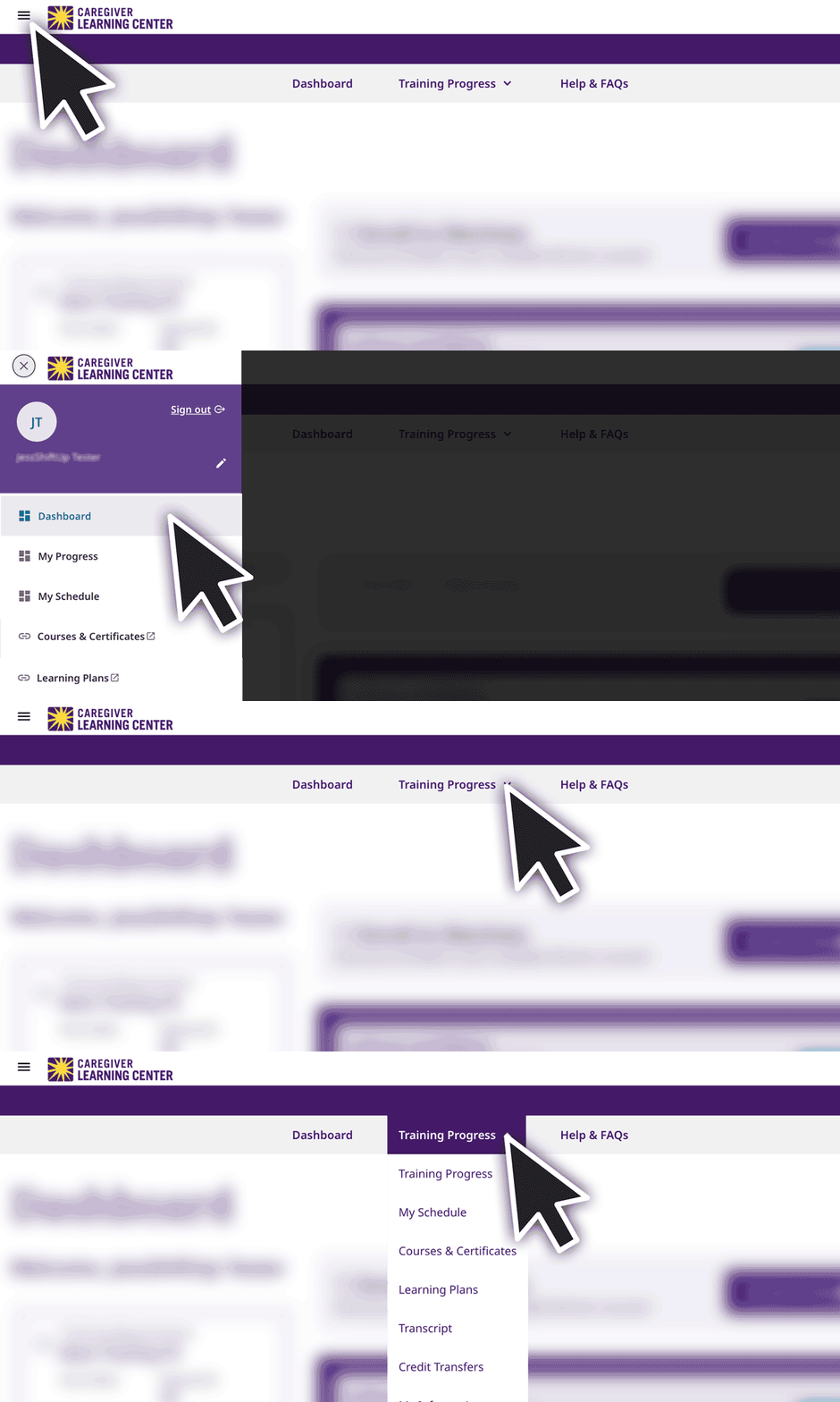
If you’re logged in the links will take you directly to the page.
Dashboard:
From your Dashboard you can:
• View your training requirement and due date.
• Check your enrollment status.
• See your scheduled courses (in-person and webinar).
• Track your online course progress .
Training Progress:
View enrolled and completed courses.
My Schedule:
View your scheduled webinars and in-person classes.
Learning Plans:
View your enrolled Learning Plan. This applies to Basic Training and some multi-course programs, like Tools for Calm. You can click on the Learning Plan to see the included courses.
Profile & Preferences
Profile Page
Click the menu icon in the top left to open the menu.
Then click the pencil icon to open the profile page to:
• Change your password
• Update your language or time zone
• Change your profile image
My Information Page
Click the menu icon in the top left to open the menu.
Then click My Information to view your contact information and employer details.
You can’t update this information yourself—to make changes, contact your employer. Once your updated information is sent to SEIU 775 Benefits Group, your account will be updated.
Enroll in Training
Contact your employer to confirm your training requirements and how to enroll.
For the best experience enrolling in training, use a computer, tablet or smartphone with the latest version of Google Chrome or Microsoft Edge.
Orientation & Safety
Orientation & Safety Training helps you start work feeling prepared and confident. It covers key information about safety, expectations and your role as a caregiver.
To Enroll:
- Login and follow the prompts to get to your Enrollment page.
- Select and click on your preferred language in the list.
EN = English, for other languages contact the MRC. - Click the Enroll button.
- Click Confirm to complete your enrollment.
You can now start, pause, and return to the course anytime.
Basic Training 70
Basic Training 70 is a 70-hour program that prepares you for the Home Care Aide (HCA) certification exam. To complete Basic Training 70, you will need to:
• Enroll in Basic Training 70
• Attend 8 full days (~49 hours) of in-person classes
• Complete 21 hours of online webinars
To Enroll:
- Login and follow the prompts to get to your Enrollment page.
- Select your language.
- Click the Select button on the Learning Plan to continue.
- Use the filters to select your start date and preferred location.
- Click View Full Schedule to review the dates.
- Click the Enroll button if the schedule works or click X to view more options.
- Click Confirm to complete your enrollment.
Basic Training 30
Basic Training 30 is a 30-hour, mostly online self-paced training.
To complete Basic Training 30, you’ll need to:
- Enroll in and complete the Basic Training 30 Learning Plan.
The Learning Plan includes 7 hours of online courses and a 3.5 hour in-person Skills Lab. - Enroll in and complete 20 hours of online elective courses.
Choose elective courses that fit your needs and the needs of those you care for.
Step1:
Enroll in Learning Plan & Skills Lab
- Login and follow the prompts to get to your Enrollment page.
- Select your language.
- Click the Select button on the Learning Plan to continue.
- Use the filters to select your start date and preferred location.
- Click View Full Schedule to review the dates.
- Click the Enroll button if the schedule works or click X to view more options.
- Click Confirm to complete your enrollment.
Step 2:
Enroll in Elective Courses:
- Return to your Dashboard and click the Enroll in Electives button.
- Select your language
- Click on a course to learn more.
- Click the Enroll button on the course page.
Basic Training 16
Basic Training 16 includes 16-hours of online self-paced training.
To complete Basic Training 16, you’ll need to:
- Enroll in and complete the Basic Training 16 Learning Plan.
The Learning Plan includes 10 hours of online courses. - Enroll in and complete 6 hours of elective courses.
Choose elective courses that fit your needs and the needs of those you care for.
Step1:
Enroll in Learning Plan & Skills Lab
- Login and follow the prompts to get to your Enrollment page.
- Select your language.
- Click the Select button on the Learning Plan to continue.
- Use the filters to select your start date and preferred location.
- Click View Full Schedule to review the dates.
- Click the Enroll button if the schedule works or click X to view more options.
- Click Confirm to complete your enrollment.
Step 2:
Enroll in Elective Courses:
- Return to your Dashboard and click the Enroll in Electives button.
- Select your language
- Click on a course to learn more.
- Click the Enroll button on the course page.
Basic Training 9
Basic Training 9 includes 9 hours of self-paced, online courses.
To complete Basic Training 9, you will need to:
- Enroll in Basic Training 9 Learning Plan and complete 4 hours of required online courses.
- Enroll in and complete 5 hours of online elective courses.
Choose elective courses that fit your needs and the needs of those you care for.
Step1:
Enroll in Learning Plan
- Login and follow the prompts to get to your Enrollment page.
- Select and click on your preferred language in the list.
EN: English
ES: Spanish
KO: Korean
RU: Russian
VI: Vietnamese
ZN: Chinese - Click the Enroll button.
- Click Confirm to complete your enrollment.
Step 2:
Enroll in Elective Courses:
- Return to your Dashboard and click the Enroll in Electives button.
- Select your language
- Click on a course to learn more.
- Click the Enroll button on the course page.
Basic Training 7
Basic Training 7 includes 7 hours of study.
To complete Basic Training 7, you will need to:
• Complete 1 hour of independent study.
• Enroll in and complete 6 hours of instructor-led webinar training.
To Enroll:
- Login and follow the prompts to get to your Enrollment page.
- Click the Select button on the Learning Plan to continue
- Use the filters to select your start date.
- Click View Full Schedule to review the dates.
- Click the Enroll button if the schedule works or click X to view more options.
- Click Confirm to complete your enrollment.
Download Your Materials :
To prepare for your first class download and complete the Ready or Not Questionnaire and your Digital Handouts. You can find these files near the bottom of your Basic Training 7 Learning Plan page.
Continuing Education
Continuing Education (CE) courses helps you build your skills and grow professionally. CE is required for some caregivers, you can confirm your requirements with your employer.
Caregivers WITH CE Requirement:
Must complete 12 hours of CE each year.
Courses are available in 3 formats:
• Online: Take courses anytime online.
• Webinars: Scheduled online courses
• In-Person: Scheduled classroom training
Caregivers WITHOUT CE Requirement:
Can take online courses as an optional benefit.
To Enroll in Online Courses:
- Login and follow the prompts to get to your Enrollment page to explore courses and enroll.
- Filter by Language.
- Click on a course to learn more.
- Click the Enroll button on the course page.
To Enroll in Webinar or In-person Classes:
- Follow steps 1-2 above.
- Filter by type: select In-Person
- Click on a course to learn more.
- Under Course Session: click the Enroll button on the schedule that works for you.
(Use the filters to sort by start date and location)
Online Courses
You can start, pause, and return to an online course anytime. Each course page tracks your progress and includes a course description and downloadable resources at the bottom of the page.
To complete online courses, the mobile app is optional but provides the best learning experience.
Begin or Resume Course
- Scroll to the bottom of the dashboard page to view your enrolled courses.
- Click on the course
- Click the Start or Resume button and follow the instructions.
Most online courses begin with a pre-assessment to check what you already know and end with a post-assessment to review what you learned. Your course will be marked complete after you finish the post-assessment.
Unenroll From Course
- Scroll to the bottom of the dashboard page to view your enrolled courses.
- Click on the course.
- Click the Schedule Options Unenroll button at the top of the course page and select uneneroll.
In-Person & Webinar Courses
In-person and webinar courses are scheduled classes that you must attend at the listed date and time.
View Schedule
View your schedule on the Dashboard or My Schedule page.
You can click on a course to see more details.
Reschedule Course
- View your schedule on your Dashboard page.
- Click on a course to go to it’s page.
- Click the Schedule Options button at the top of the page.
- Select Change Session Enrollment to view your options.
- Click the Change button on the course session you would like to enroll in.
You will see the new schedule on your Dashboard page.
Unenroll From Course
- Scroll to the bottom of the dashboard page to view your enrolled courses.
- Click on the course.
- Click the Schedule Options Unenroll button at the top of the course page and select unenroll.
Note: You can reschedule, but not unenroll, from a Basic Training Course.
Get Webinar Link
View your schedule on the Dashboard page.
Click the link to the right of the course name to begin your webinar training.
Download & Use Zoom
To use Zoom, you will need a computer, tablet, or smartphone with audio and video, along with a reliable internet or WiFi connection. We recommend that you download and install Zoom at least a day prior to your webinar.
Download Zoom for you device at zoom.us/download.
Use the Getting started with Zoom and Zoom video, audio & chat guides to learn how to troubleshoot your audio and video, use chat features, and update your Zoom preferences.
Transcripts & Credit Transfers
View your completed training, download your transcript, and check the status of any submitted credit transfers.
Transcripts
To view or download your training transcript* (completed courses and training history) visit the Transcript page.
Desktop
- Click Training Progress in the navigation bar at the top of the page.
- Select select Transcript in the drop down menu.
- Click View or Download.
Mobile & Tablet
- Click the menu icon in the top left corner.
- Select Transcript in the menu.
- Click View or Download.
*Transcript data typically reflects course completions within 2 business days.
Credit Transfers
Use the Credit Transfers page to view the status of submitted credit transfers and any approved training credits added to your record for courses completed outside of the Caregiver Learning Center.
Desktop
- Click Training Progress in the navigation bar at the top of the page.
- Select select Credit Transfers in the drop down menu.
- Click View or Download.
Mobile & Tablet
- Click the menu icon in the top left corner.
- Select Credit Transfers in the menu.
Member Resource Center (MRC)
If you have questions about enrolling, course options or completing training, contact the MRC. Support is available in multiple languages.
Language Support
Classes and course materials are available in many languages. Even if you speak English fluently, a course in your primary language may better set you up for success.
Peer Mentors
If you are a caregiver going through Basic Training and preparing to become a certified Home Care Aide (HCA), you can get guidance and support from Peer Mentors.
Support for Students with Disabilities
Students with disabilities have the right to request and receive reasonable accommodation in order to receive all of the Training Partnership’s programs and activities.
Training Policies
Your class time is valuable. The following policies ensure a positive learning environment in which you are supported and have the opportunity to be successful.